Arthas初识

前言


在看JVM性能调优和故障处理工具的时候JDK提供了一些比较好用的工具,比如说jps是一个用来监控虚拟机的进程状况的工具,jstat是一个虚拟机统计信息监视的工具,jinfo是一个Java配置信息工具,jmap是一个Java内存映像工具,jstack是一个堆栈跟踪工具等等,这些工具都十分小巧实用。但是最近发现一个阿里开源的Java在线诊断工具Arthas(阿尔萨斯),可堪称诊断利器。官方文档是这么介绍的:

当你遇到以下类似问题而束手无策时,Arthas可以帮助你解决:

  1. 这个类从哪个 jar 包加载的?为什么会报各种类相关的 Exception?
  2. 我改的代码为什么没有执行到?难道是我没 commit?分支搞错了?
  3. 遇到问题无法在线上 debug,难道只能通过加日志再重新发布吗?
  4. 线上遇到某个用户的数据处理有问题,但线上同样无法 debug,线下无法重现!
  5. 是否有一个全局视角来查看系统的运行状况?
  6. 有什么办法可以监控到JVM的实时运行状态?

这么强大的功能,看起来就十分吸引人,赶紧学起来。

先放上官方的链接 Arthas用户文档

一些命令的使用在官方文档上都有详细的解释,这边个人觉得jad、mc、redefine这几个命令比较有意思,就简单记录一下。其实这几个命令也就是解决上面的2、3、4的问题。其中如何安装和启动Arthas就不赘述了,在官方文档里有详细的说明。

jad

jad能够反编译Class成Java文件。

1
jad --source-only com.arthas.demo

com.arthas.demo 是要反编译的Class

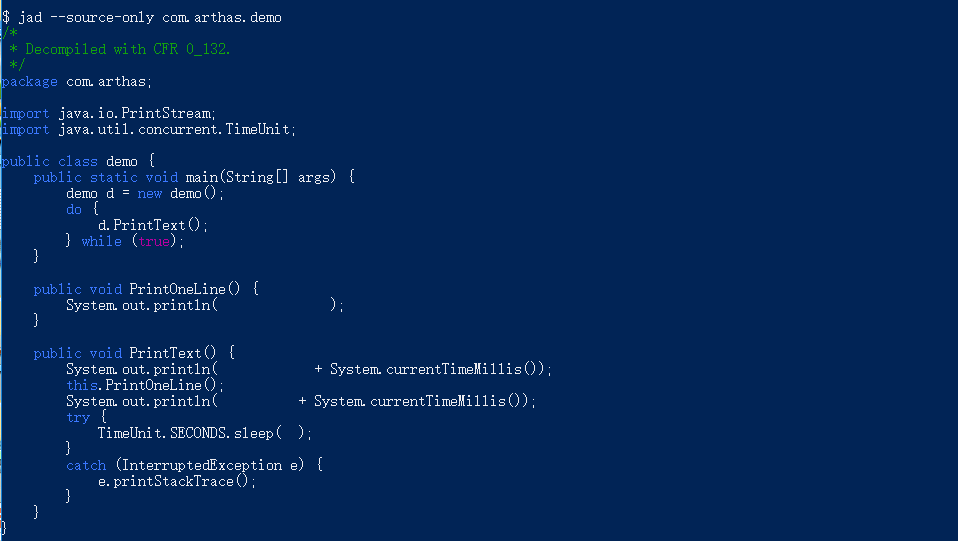
输出结果如下

jad反编译

有些时候为了方便看我们想要执行的代码是否执行到了,可以将Class反编译的Java文件另存到一个目录下面,再打开它。

1
jad --source-only com.arthas.demo > ./demo.java

mc

mc用来将Java源文件编译成class文件

1
mc MathGame.java -d ./

redefine

redefine是用来加载外部的class文件,用redefine修改掉JVM方法区中对应的class,能够在不重新发布的情况下修改掉程序或者增添日志。即实现热更新

一般是这么使用的,这边举例说明。首先定义这么一个类。

1
2
3
4
5
6
7
8
9
10
11
12
13
14
15
16
17
18
19
20
21
22
23
24
25
26
27
28
29
30
package com.arthas;
import java.util.concurrent.TimeUnit;
/**
* @Author: hqf
* @description:
* @Data: Create in 14:03 2019/8/9
* @Modified By:
*/
public class demo {
public void PrintOneLine(){
System.out.println("hello world!");
}

public void PrintText(){
System.out.println("startTime" + System.currentTimeMillis());
PrintOneLine();
System.out.println("endTime" + System.currentTimeMillis());
try {
TimeUnit.SECONDS.sleep(1L);
} catch (InterruptedException e) {
e.printStackTrace();
}
}
public static void main(String[] args) {
demo d = new demo();
while (true){
d.PrintText();
}
}
}

将其打包成jar包,我这边用assembly打包方式,其中pom.xml,具体的方式可百度解决。

1
2
3
4
5
6
7
8
9
10
11
12
13
14
15
16
17
18
19
20
21
22
23
24
25
26
27
28
29
30
31
32
33
34
35
36
37
38
39
40
41
42
43
44
45
46
47
48
49
50
51
52
53
54
55
56
57
58
59
60
61
62
63
64
65
66
67
68
69
70
71
72
73
74
75
<?xml version="1.0" encoding="UTF-8"?>
<project xmlns="http://maven.apache.org/POM/4.0.0"
xmlns:xsi="http://www.w3.org/2001/XMLSchema-instance"
xsi:schemaLocation="http://maven.apache.org/POM/4.0.0 http://maven.apache.org/xsd/maven-4.0.0.xsd">
<modelVersion>4.0.0</modelVersion>

<groupId>com.arthas</groupId>
<artifactId>ArthasTest</artifactId>
<version>1.0-SNAPSHOT</version>

<dependencies>
<dependency>
<groupId>org.apache.httpcomponents</groupId>
<artifactId>httpclient</artifactId>
<version>4.5.6</version>
</dependency>

</dependencies>
<build>
<finalName>ArthasDemo</finalName>
<pluginManagement><!-- lock down plugins versions to avoid using Maven defaults (may be moved to parent pom) -->
<plugins>
<plugin>
<artifactId>maven-clean-plugin</artifactId>
<version>3.0.0</version>
</plugin>
<!-- see http://maven.apache.org/ref/current/maven-core/default-bindings.html#Plugin_bindings_for_jar_packaging -->
<plugin>
<artifactId>maven-resources-plugin</artifactId>
<version>3.0.2</version>
</plugin>

<plugin>
<artifactId>maven-compiler-plugin</artifactId>
<version>3.7.0</version>
<configuration>
<source>1.8</source>
<target>1.8</target>
</configuration>
</plugin>

<plugin>
<artifactId>maven-surefire-plugin</artifactId>
<version>2.20.1</version>
</plugin>

<plugin>
<artifactId>maven-assembly-plugin</artifactId>
<version>2.4</version>
<configuration>
<descriptors>
<descriptor>src/main/resources/assembly.xml</descriptor>
</descriptors>
<archive>
<manifest>

<mainClass>com.arthas.demo</mainClass>
</manifest>
</archive>
<outputDirectory>/javaproject/ArthasTest/target</outputDirectory>
</configuration>
<executions>
<execution>
<id>make-assembly</id> <!-- this is used for inheritance merges -->
<phase>package</phase> <!-- bind to the packaging phase -->
<goals>
<goal>assembly</goal>
</goals>
</execution>
</executions>
</plugin>
</plugins>
</pluginManagement>
</build>
</project>

在resources下新建一个assembly.xml文件

1
2
3
4
5
6
7
8
9
10
11
12
13
14
15
16
17
18
19
20
21
22
23
24
25
26
27
28
29
<?xml version='1.0' encoding='UTF-8'?>
<assembly>
<id>2.0</id>
<formats>
<format>jar</format>
</formats>
<includeBaseDirectory>false</includeBaseDirectory>
<fileSets>
<fileSet>
<directory>${project.build.directory}/classes</directory>
<outputDirectory>/</outputDirectory>
</fileSet>
</fileSets>
<dependencySets>

<dependencySet>
<!--
不使用项目的artifact,第三方jar不要解压,打包进外部依赖jar文件的lib目录
-->
<useProjectArtifact>true</useProjectArtifact>
<outputDirectory>lib</outputDirectory>
<unpack>false</unpack>
<includes>
<include>org.jsoup:*</include>
</includes>
<scope>compile</scope>
</dependencySet>
</dependencySets>
</assembly>

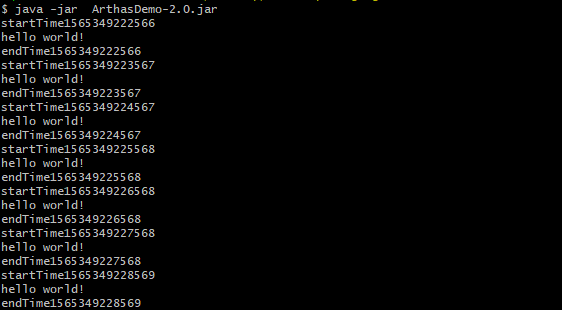
将工程打成jar包放在服务器上执行。

.jar运行的情况

接下来我们简单修改函数中的内容

1
2
3
4
public void PrintOneLine(){
// 就修改该位置的输出信息
System.out.println("Bye-Bye!");
}

重新编译这个java文件成class文件。

启动Arthas,使用redefine命令。

1
2
$ redefine demo.class
redefine success, size: 1

重定义成功,看一下运行着的项目成功的修改掉了代码中的内容。

修改后的.jar运行情况

总结

​ 一般来说,jad、mc、redefine三个命令在线上是一起使用的,具体的步骤是第一步:用jad命令反编译出你想要的的那个类的Java文件,接着可以直接用vim对Java中的文件进行修改。第二步:用mc命令重新编译Java文件成class文件。由于有些时候mc的时候会有问题,这时候也可以用javac手动编译。第三步:用redefine命令对想要修改的class文件进行修改。

​ 但是,redefine也有一定的使用局限性,并不是可以任意使用。官方文档里这么描述

  • 不允许新增加field/method
  • 正在跑的函数,没有退出不能生效,比如下面新增加的System.out.println,只有run()函数里的会生效
1
2
3
4
5
6
7
8
9
10
11
12
13
14
15
16
17
18
19
20
21
22
public class MathGame {
public static void main(String[] args) throws InterruptedException {
MathGame game = new MathGame();
while (true) {
game.run();
TimeUnit.SECONDS.sleep(1);
// 这个不生效,因为代码一直跑在 while里
System.out.println("in loop");
}
}

public void run() throws InterruptedException {
// 这个生效,因为run()函数每次都可以完整结束
System.out.println("call run()");
try {
int number = random.nextInt();
List<Integer> primeFactors = primeFactors(number);
print(number, primeFactors);
} catch (Exception e) {
System.out.println(String.format("illegalArgumentCount:%3d, ", illegalArgumentCount) + e.getMessage());
}
}