RocketMQ源码学习之高可用分析(一)

前言


RocketMQ分布式集群是通过其中各个模块的配合实现高可用,RocketMQ的高可用主要可以从Producer、Consumer、Broker和NameServer出发来分析,本章旨在通过源码来简单分析其中Producer的高可用原理。其他部分在后续章节继续分析。
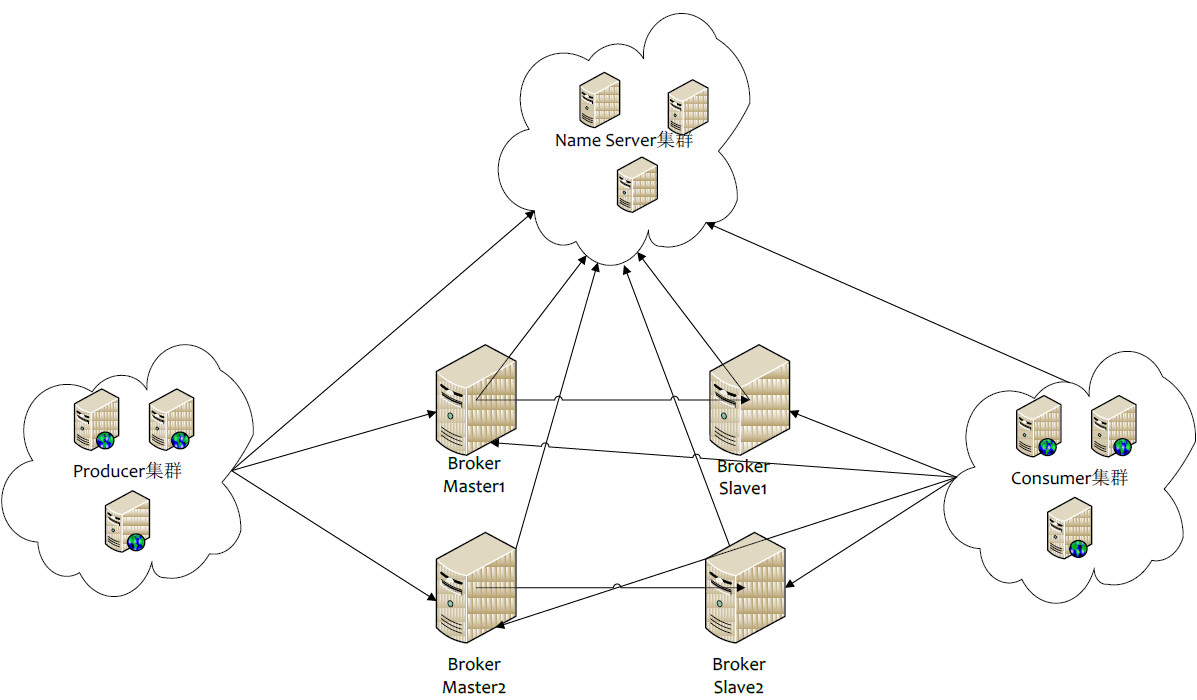
RocketMQ集群架构图

一、消息发送的流程

消息发送主要的步骤为:验证消息、查找路由、消息发送(包括异常处理机制)

消息验证:消息长度验证

在发送消息之前,首先需要确保生产者处于运行状态,然后验证消息是否符合相应的规范,具体的规范要求是主题名称、消息体不能为空、消息长度不能等于0且默认不能超过允许发送消息的最大长度4M(maxMessageSize=1024*1024*4)

查找路由

消息发送

  1. 检查消息发送是否合理
    • 检查该broker是否有写权限
    • 检查该Topic是否可以进行消息发送
    • 在nameserver端存储主题的配置信息
    • 检查队列,如果队列不合法,返回错误码
  2. 如果消息重试次数超过允许的最大重试次数,消息将进入到DLD延迟队列。延迟队列主题:%DLQ%+消费组名。
  3. 调用DefaultMessageStore#putMessage进行消息存储。

注意:消息发送方式有三种,分别是同步发送、异步发送和单向发送。其中同步和异步都可以控制重试次数,但是单向没有重试机制。

二、Producer发送消息高可用

在消息创建消息时,需要为每一个消息指定一个topic。topic会创建在每一个Broker组中,也就是说即使一个Broker组的Master不可用了,但是集群中其他Broker组仍然可以接收生产者生产的消息,Producer仍然可以发送消息。下面通过定位到发送消息的源代码看其如何实现高可用。

首先要发送一条消息通常代码逻辑是这样子的,在基础概念的篇章就详细的介绍了关于各种类型消息的生产和发送的方法,可以回顾这篇博客

1
2
3
4
5
6
7
8
public static void main(String[] args) throws Exception {
// 实例化消息生产者Producer
DefaultMQProducer producer = new DefaultMQProducer("group1");
//...中间代码省略
// 发送消息到一个Broker
SendResult sendResult = producer.send(msg);
//...后续代码省略
}

让我们跟到send方法里面进去看一下,进到org.apache.rocketmq.client.producer.DefaultMQProducer类中

1
2
3
4
5
6
7
8
9
@Override
public SendResult send(
Message msg) throws MQClientException, RemotingException, MQBrokerException, InterruptedException {
// 验证消息topic或者body是否为空,是否长度超过给定长度等等问题。
Validators.checkMessage(msg, this);
// 通过处理重新设置topic属性。
msg.setTopic(withNamespace(msg.getTopic()));
return this.defaultMQProducerImpl.send(msg);
}

继续跟进去,到这步分析一下,进到org.apache.rocketmq.client.impl.producer.DefaultMQProducerImpl类中,因为消息发送有三种模式,分别是同步发送消息,异步发送消息和单向发送消息,最终都是调用的该类下的sendDefaultImpl方法,通过参数来选择消息的发送方式。

1
2
3
4
5
6
public enum CommunicationMode {
SYNC,
ASYNC,
ONEWAY;
//...省略
}

sendDefaultImpl通过communicationMode参数来选择三种消息发送方式中的一种,sendCallback参数来设置是否有回调,这边同步和单向都是没有回调方法的,只有异步才有回调,从而来对消息发送结果返回做出进一步处理。以下是总的代码,很长一段,后面会有相应断点的解释。

1
2
3
4
5
6
7
8
9
10
11
12
13
14
15
16
17
18
19
20
21
22
23
24
25
26
27
28
29
30
31
32
33
34
35
36
37
38
39
40
41
42
43
44
45
46
47
48
49
50
51
52
53
54
55
56
57
58
59
60
61
62
63
64
65
66
67
68
69
70
71
72
73
74
75
76
77
78
79
80
81
82
83
84
85
86
87
88
89
90
91
92
93
94
95
96
97
98
99
100
101
102
103
104
105
106
107
108
109
110
111
112
113
114
115
116
117
118
119
120
121
122
123
124
125
126
127
128
129
130
131
132
133
134
135
136
137
138
139
140
141
142
143
144
145
146
147
148
149
private SendResult sendDefaultImpl(
Message msg,
final CommunicationMode communicationMode,
final SendCallback sendCallback,
final long timeout
) throws MQClientException, RemotingException, MQBrokerException, InterruptedException {
this.makeSureStateOK();
Validators.checkMessage(msg, this.defaultMQProducer);
final long invokeID = random.nextLong();
long beginTimestampFirst = System.currentTimeMillis();
long beginTimestampPrev = beginTimestampFirst;
long endTimestamp = beginTimestampFirst;
// 断点1:根据topic获取路由对象
TopicPublishInfo topicPublishInfo = this.tryToFindTopicPublishInfo(msg.getTopic());
if (topicPublishInfo != null && topicPublishInfo.ok()) {
// 初始化变量
boolean callTimeout = false;
MessageQueue mq = null; // 要发送消息到的消息队列
Exception exception = null;
SendResult sendResult = null; // 发送结果
int timesTotal = communicationMode == CommunicationMode.SYNC ? 1 + this.defaultMQProducer.getRetryTimesWhenSendFailed() : 1;
int times = 0;
String[] brokersSent = new String[timesTotal];
// 循环发送消息,注意重试的次数。同步发送重试3次,异步和直接发送重试1次。
for (; times < timesTotal; times++) {
String lastBrokerName = null == mq ? null : mq.getBrokerName();
// 断点2:消息发送的负载均衡:选择要发送消息去哪一个消息队列中,因为我们知道每一个topic都对应着好多个队列,对应不止一台的broker,这是发送消息高可用的具体表现。
MessageQueue mqSelected = this.selectOneMessageQueue(topicPublishInfo, lastBrokerName);
if (mqSelected != null) {
mq = mqSelected;
brokersSent[times] = mq.getBrokerName();
try {
beginTimestampPrev = System.currentTimeMillis();
if (times > 0) {
//Reset topic with namespace during resend.
msg.setTopic(this.defaultMQProducer.withNamespace(msg.getTopic()));
}
long costTime = beginTimestampPrev - beginTimestampFirst;
if (timeout < costTime) {
callTimeout = true;
break;
}
// 发送消息
sendResult = this.sendKernelImpl(msg, mq, communicationMode, sendCallback, topicPublishInfo, timeout - costTime);
endTimestamp = System.currentTimeMillis();
// 更新broker可用性信息。
this.updateFaultItem(mq.getBrokerName(), endTimestamp - beginTimestampPrev, false);
// 发送返回的结果
switch (communicationMode) {
case ASYNC:
return null;
case ONEWAY:
return null;
case SYNC:
if (sendResult.getSendStatus() != SendStatus.SEND_OK) {
if (this.defaultMQProducer.isRetryAnotherBrokerWhenNotStoreOK()) {
continue;
}
}

return sendResult;
default:
break;
}
} catch (RemotingException e) {
endTimestamp = System.currentTimeMillis();
this.updateFaultItem(mq.getBrokerName(), endTimestamp - beginTimestampPrev, true);
log.warn(String.format("sendKernelImpl exception, resend at once, InvokeID: %s, RT: %sms, Broker: %s", invokeID, endTimestamp - beginTimestampPrev, mq), e);
log.warn(msg.toString());
exception = e;
continue;
} catch (MQClientException e) {
endTimestamp = System.currentTimeMillis();
this.updateFaultItem(mq.getBrokerName(), endTimestamp - beginTimestampPrev, true);
log.warn(String.format("sendKernelImpl exception, resend at once, InvokeID: %s, RT: %sms, Broker: %s", invokeID, endTimestamp - beginTimestampPrev, mq), e);
log.warn(msg.toString());
exception = e;
continue;
} catch (MQBrokerException e) {
endTimestamp = System.currentTimeMillis();
this.updateFaultItem(mq.getBrokerName(), endTimestamp - beginTimestampPrev, true);
log.warn(String.format("sendKernelImpl exception, resend at once, InvokeID: %s, RT: %sms, Broker: %s", invokeID, endTimestamp - beginTimestampPrev, mq), e);
log.warn(msg.toString());
exception = e;
switch (e.getResponseCode()) {
case ResponseCode.TOPIC_NOT_EXIST:
case ResponseCode.SERVICE_NOT_AVAILABLE:
case ResponseCode.SYSTEM_ERROR:
case ResponseCode.NO_PERMISSION:
case ResponseCode.NO_BUYER_ID:
case ResponseCode.NOT_IN_CURRENT_UNIT:
continue;
default:
if (sendResult != null) {
return sendResult;
}

throw e;
}
} catch (InterruptedException e) {
endTimestamp = System.currentTimeMillis();
this.updateFaultItem(mq.getBrokerName(), endTimestamp - beginTimestampPrev, false);
log.warn(String.format("sendKernelImpl exception, throw exception, InvokeID: %s, RT: %sms, Broker: %s", invokeID, endTimestamp - beginTimestampPrev, mq), e);
log.warn(msg.toString());

log.warn("sendKernelImpl exception", e);
log.warn(msg.toString());
throw e;
}
} else {
break;
}
}

if (sendResult != null) {
return sendResult;
}

String info = String.format("Send [%d] times, still failed, cost [%d]ms, Topic: %s, BrokersSent: %s",
times,
System.currentTimeMillis() - beginTimestampFirst,
msg.getTopic(),
Arrays.toString(brokersSent));

info += FAQUrl.suggestTodo(FAQUrl.SEND_MSG_FAILED);

MQClientException mqClientException = new MQClientException(info, exception);
if (callTimeout) {
throw new RemotingTooMuchRequestException("sendDefaultImpl call timeout");
}

if (exception instanceof MQBrokerException) {
mqClientException.setResponseCode(((MQBrokerException) exception).getResponseCode());
} else if (exception instanceof RemotingConnectException) {
mqClientException.setResponseCode(ClientErrorCode.CONNECT_BROKER_EXCEPTION);
} else if (exception instanceof RemotingTimeoutException) {
mqClientException.setResponseCode(ClientErrorCode.ACCESS_BROKER_TIMEOUT);
} else if (exception instanceof MQClientException) {
mqClientException.setResponseCode(ClientErrorCode.BROKER_NOT_EXIST_EXCEPTION);
}

throw mqClientException;
}

validateNameServerSetting();

throw new MQClientException("No route info of this topic: " + msg.getTopic() + FAQUrl.suggestTodo(FAQUrl.NO_TOPIC_ROUTE_INFO),
null).setResponseCode(ClientErrorCode.NOT_FOUND_TOPIC_EXCEPTION);
}

代码很长,分开解释一下,首先进入到断点1中tryToFindTopicPublishInfo

1
2
3
4
5
6
7
8
9
10
11
12
13
14
15
16
17
18
19
20
private TopicPublishInfo tryToFindTopicPublishInfo(final String topic) {
// 从缓存中获取路由信息,第一次缓存中肯定是没有数据的
TopicPublishInfo topicPublishInfo = this.topicPublishInfoTable.get(topic);
if (null == topicPublishInfo || !topicPublishInfo.ok()) {
// 如果找不到,则添加到缓存表中
this.topicPublishInfoTable.putIfAbsent(topic, new TopicPublishInfo());
// 从nameServer获取数据进行更新
this.mQClientFactory.updateTopicRouteInfoFromNameServer(topic);
// 重新更新一遍路由表
topicPublishInfo = this.topicPublishInfoTable.get(topic);
}

if (topicPublishInfo.isHaveTopicRouterInfo() || topicPublishInfo.ok()) {
return topicPublishInfo;
} else {
this.mQClientFactory.updateTopicRouteInfoFromNameServer(topic, true, this.defaultMQProducer);
topicPublishInfo = this.topicPublishInfoTable.get(topic);
return topicPublishInfo;
}
}

断点2:producer发送消息的负载均衡策略。

1
2
3
4
5
6
7
8
9
10
11
12
13
14
15
16
17
18
19
20
21
22
23
24
25
26
27
28
29
30
31
32
33
34
35
36
37
38
39
40
41
42
public MessageQueue selectOneMessageQueue(final TopicPublishInfo tpInfo, final String lastBrokerName) {
// sendLatencyFaultEnable是一个开关,代表是否开启Broker故障延迟机制
// 下面的if是代表开启的情况
if (this.sendLatencyFaultEnable) {
try {
// 随机获得一个数
int index = tpInfo.getSendWhichQueue().getAndIncrement();
for (int i = 0; i < tpInfo.getMessageQueueList().size(); i++) {
int pos = Math.abs(index++) % tpInfo.getMessageQueueList().size();
if (pos < 0)
pos = 0;
// 通过轮询的方式获得一个mq
MessageQueue mq = tpInfo.getMessageQueueList().get(pos);
// latencyFaultTolerance可以认为是存放所有已经发生过错误的broker存放的集合,详细类的构造可以再deep进去,这边就不进行分析了。
// 如果mq对应的broker有效
if (latencyFaultTolerance.isAvailable(mq.getBrokerName())) {
if (null == lastBrokerName || mq.getBrokerName().equals(lastBrokerName))
return mq;
}
}
// 如果每个broker都发生过错误,则都会被记录下来,就选择一个较好的broker
final String notBestBroker = latencyFaultTolerance.pickOneAtLeast();
int writeQueueNums = tpInfo.getQueueIdByBroker(notBestBroker);
if (writeQueueNums > 0) {
final MessageQueue mq = tpInfo.selectOneMessageQueue();
if (notBestBroker != null) {
mq.setBrokerName(notBestBroker);
mq.setQueueId(tpInfo.getSendWhichQueue().getAndIncrement() % writeQueueNums);
}
return mq;
} else {
latencyFaultTolerance.remove(notBestBroker);
}
} catch (Exception e) {
log.error("Error occurred when selecting message queue", e);
}
// 以上两种情况都不发生,即此次是第一次进行消息的发送选择发送的broker(因为如果已经发送过一次还需要再次发送的话就说明已经发送的这次是发送失败的,就走的是上面的逻辑了),发送成功与否不知道。
return tpInfo.selectOneMessageQueue();
}
// ②这个是代表不开启Broker故障延迟机制
return tpInfo.selectOneMessageQueue(lastBrokerName);
}

先来简单介绍不开启Broker故障延迟机制的情况,也就是上面②的情况,默认情况下是不开启的。见如下的代码。

1
2
3
4
5
6
7
8
9
10
11
12
13
14
15
16
17
18
19
20
21
22
23
24
25
26
27
28
29
30
public MessageQueue selectOneMessageQueue(String lastBrokerName) {
// 当上一次的brokername为null,代表上一次发送消息成功。
if (lastBrokerName == null) {
return this.selectOneMessageQueue();
} else {
// 上一次发送消息不成功。sendWhichQueue是一个threadlocal的变量,初始值就是一个随机值,首先随机取一个queue进行消息发送,之后就轮训的进行消息发送。
int index = this.sendWhichQueue.getAndIncrement();
for(int i = 0; i < this.messageQueueList.size(); ++i) {
int pos = Math.abs(index++) % this.messageQueueList.size();
if (pos < 0) {
pos = 0;
}
MessageQueue mq = (MessageQueue)this.messageQueueList.get(pos);
// 上次失败的broker就不进行选择了,注意只是上次失败的不选择,万一有另外一台宕机的会被选到,从而也会导致发送消息失败。
if (!mq.getBrokerName().equals(lastBrokerName)) {
return mq;
}
}
return this.selectOneMessageQueue();
}
}
// 通过做加加再取模来实现简单的轮询,和上面的逻辑是一样的。
public MessageQueue selectOneMessageQueue() {
int index = this.sendWhichQueue.getAndIncrement();
int pos = Math.abs(index) % this.messageQueueList.size();
if (pos < 0) {
pos = 0;
}
return (MessageQueue)this.messageQueueList.get(pos);
}

总结不开启故障延迟机制的情况,这边我一开始是有一个疑问的。既然已经有了这种失败不选择的机制,为何还要有后面的故障延迟机制呢?答案是上面的这种普通的故障处理方法只能规避上一次失败的broker,而不能规避两个及以上的broker的情况,比如上次失败的broker记录的是A机器,但是在轮询到B机器的时候,B也发生了故障,但是lastBrokerName却记录的是上一次失败的broker,也就是A,那么B这台宕机的机器还是被选择到了,没有被有效的规避掉,消息仍然不能成功发送。以上就是这种机制的问题所在,所以才有了下面的故障延迟机制的出现。

结合RocketMQ的书和源码又理解了一下:这边选择的话不管是否开启故障延迟机制都是通过轮询的方式进行负载均衡的选择,只不过一开始的选的MessageQueue是随机数选出来的,后面的是通过加1的操作一个一个轮询过去。一般默认情况下,一个topic的消息对应了一台broker中的四个MessageQueue,比如

Broker-A中有四个MessageQueue,分别是A-queue-id=0、A-queue-id=1、A-queue-id=2、A-queue-id=3

Broker-B中有四个MessageQueue,分别是B-queue-id=0、B-queue-id=1、B-queue-id=2、B-queue-id=3

在不开启故障延迟机制的情况下(一般默认也是不开启这个机制的),假如一开始通过随机数出数字3,那也就会选择到A-queue-id=2这个MessageQueue,如果发送消息失败,这时候就会记录下这个MessageQueue的brokerName到一个LastBrokerName变量中,继续发送消息,那么这次消息的发送就不会发送到LastBrokerName中记录的那个broker中的A-queue-id=3,而是发送给B-queue-id=0,所以不开启集群容错在发送本消息的时候能规避掉上次失败的那个broker。但是会有两个问题

  • 第一个问题是其他消息发送的时候也可能会选择到这台故障的broker,还是会引发重试,带来不必要的性能损耗(解释一下为什么故障了的broker仍然可能被其他消息选择到呢?首先,NameServer检测Broker是否可用是有延迟的,之前有提到是10s做一次心跳检测,其次NameServer不会检测到Broker宕机后就马上推送消息给消息生产者,而消息生产者是每隔30s更新一次路由信息,所以并不能马上感知到这个Broker是故障的)。
  • 第二个问题是它只能记录下上次失败的那个broker的信息,而可能上上次失败的broker不会被记录下来,上上次的broker可能还是处于宕机状态,这点也就是之前理解到的,可以看一下上面的解释。

所以引入了故障延迟机制。

当开启故障延迟机制的时候,见原来代码中的注释。

ok,回到原来断点2的位置,接下去的逻辑就是用sendKernelImpl方法进行消息的发送,并用updateFaultItem进行broker可用性的更新。updateFaultItem进行broker更新一般发送消息来说只需要更新一次,因为消息发送成功了就不用再尝试发送了,但是当消息发送失败的时候会在不同的catch中也会进行broker的更新操作。

1
2
3
4
5
6
7
8
9
10
11
12
13
14
15
16
17
18
19
private long[] latencyMax = {50L, 100L, 550L, 1000L, 2000L, 3000L, 15000L};
private long[] notAvailableDuration = {0L, 0L, 30000L, 60000L, 120000L, 180000L, 600000L};

public void updateFaultItem(final String brokerName, final long currentLatency, boolean isolation) {
if (this.sendLatencyFaultEnable) {
// isolation表示是否隔离。如果是隔离的话,默认延迟为30s。否则为currentLatency,也就是消息发送的时间。最后通过computeNotAvailableDuration获得一个规避时间。比如isolation为false,currentLatency==560,最终得到的规避时间duration=30000L=30s
long duration = computeNotAvailableDuration(isolation ? 30000 : currentLatency);
//
this.latencyFaultTolerance.updateFaultItem(brokerName, currentLatency, duration);
}
}

private long computeNotAvailableDuration(final long currentLatency) {
for (int i = latencyMax.length - 1; i >= 0; i--) {
if (currentLatency >= latencyMax[i])
return this.notAvailableDuration[i];
}
return 0;
}

最终这个规避时间是体现在上面开启Broker故障延迟机制的selectOneMessageQueue函数相应的逻辑中,给所有发送消息失败的broker都设置延迟,只有当到了延迟的时间,最终才会有效,且能有机会被重新选择到。

总结:

在分析Producer过程中遇到的坑就是文章中提到的不明白为何在有了一个负载均衡机制的情况下还要有一个故障延迟机制,在仔细研究相关部分的代码后问题算是很好的解决了。

我认为Producer的高可用主要体现在以下几个方面。首先,在消息创建消息时,需要为每一个消息指定一个topic。topic会创建在每一个Broker组中,也就是说即使一个Broker组的Master不可用了,但是集群中其他Broker组仍然可以接收生产者生产的消息,Producer仍然可以发送消息。其次,光能选择其他broker也是不行的,还需要有容错的机制,也就是上面提到的默认的记录上一次失败broker的机制以及后面分析的故障延迟机制,都能让无法正常工作的broker被频繁连接,以免造成发送数据的成功率低和加快效率低的问题。


参考

https://www.jianshu.com/p/ba36e1c9de5f